

Concepts
What is Plugwerk?
Section titled “What is Plugwerk?”PF4J provides a lightweight plugin framework for Java applications — but it only handles loading and unloading plugins at runtime. It does not offer a way to discover, distribute, or manage plugins across teams and environments.
Plugwerk fills this gap. It is a self-hosted plugin management and marketplace platform that gives PF4J-based applications a central place to:
- Browse and search a curated plugin catalog
- Install and update plugins at runtime — no application restart required
- Publish and review plugin releases through a controlled workflow
- Manage access with namespaces, roles, and API keys
Think of it as your own private Maven Central, but for runtime plugins instead of build dependencies.
Architecture Overview
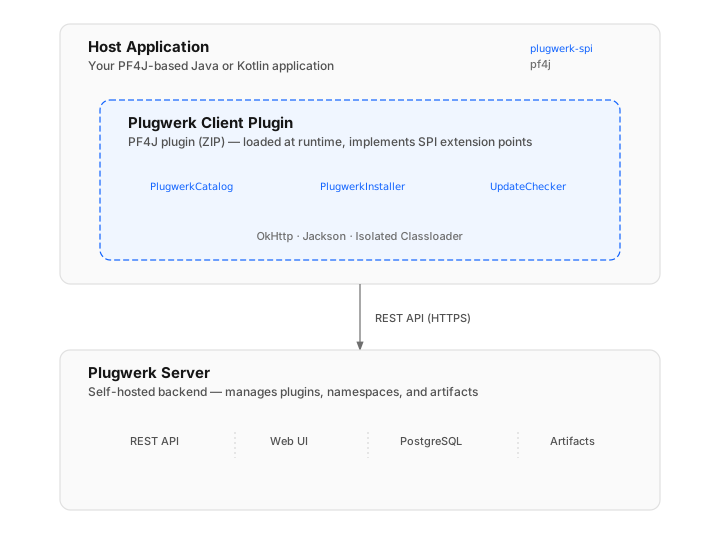
Section titled “Architecture Overview”Plugwerk consists of three main layers that work together:
Host Application
Section titled “Host Application”Your existing Java or Kotlin application that uses PF4J for plugin management. It depends on plugwerk-spi at compile time, which provides the interfaces to interact with the Plugwerk ecosystem. The host application does not depend on the server or the client plugin at compile time.
Plugwerk Client Plugin
Section titled “Plugwerk Client Plugin”A PF4J plugin (packaged as a ZIP bundle) that you drop into your host application’s plugin directory. It implements the SPI extension points and handles all communication with the Plugwerk Server over HTTPS. Because it runs inside PF4J’s isolated classloader, it brings its own dependencies (OkHttp, Jackson) without conflicting with your application.
Plugwerk Server
Section titled “Plugwerk Server”The self-hosted backend that manages the plugin catalog, artifact storage, user authentication, and the review workflow. It provides a REST API consumed by the client plugin and a web UI for administrators and plugin developers.
The server includes:
| Component | Purpose |
|---|---|
| REST API | Plugin CRUD, search, upload, download |
| Web UI | Catalog browsing, plugin review, admin console |
| PostgreSQL | Metadata, users, namespaces, release lifecycle |
| Artifact Storage | Binary storage for plugin JARs and ZIPs |
Core Concepts
Section titled “Core Concepts”Namespace
Section titled “Namespace”A namespace is a logical scope that groups all plugins for one product or team. Every plugin, release, and API key belongs to exactly one namespace.
Namespaces can be public (catalog browsable without authentication) or private (all access requires credentials). Each namespace has its own set of members with role-based access control.
Example: An organization running two products might create the namespaces acme-crm and acme-erp, each with their own plugin catalog and access rules.
Plugin Descriptor
Section titled “Plugin Descriptor”Every plugin artifact (JAR or ZIP) contains a plugin descriptor — metadata stored in the standard MANIFEST.MF file. The descriptor includes the plugin’s unique ID, version, dependencies, and other attributes that Plugwerk and PF4J use to identify and manage the plugin.
For the full list of supported attributes, see the Plugin Descriptor reference.
Plugin Release Lifecycle
Section titled “Plugin Release Lifecycle”Plugin releases go through three states: Draft → Published → Archived. This controlled workflow ensures that only reviewed and approved plugins become visible in the catalog.
For the full lifecycle from build to runtime installation, see Plugin Lifecycle.
SPI Extension Points
Section titled “SPI Extension Points”The Service Provider Interface (plugwerk-spi) defines the contracts that the client plugin implements and the host application consumes. There are three main extension points:
| Extension Point | Purpose |
|---|---|
PlugwerkCatalog |
Browse and search the remote plugin catalog |
PlugwerkInstaller |
Download, verify (SHA-256), install (load + start), and uninstall plugins |
PlugwerkUpdateChecker |
Check installed plugins for available updates |
A fourth interface, PlugwerkMarketplace, acts as a unified facade combining all three. It implements AutoCloseable and is obtained via PlugwerkPlugin.connect(config) — see Configuration.
Authentication
Section titled “Authentication”Plugwerk uses a dual-token model for authentication:
| Token Type | Header | Lifetime | Use Case |
|---|---|---|---|
| API Key | X-Api-Key |
Long-lived | Clients, CI/CD pipelines |
| JWT Bearer | Authorization: Bearer |
8 hours | Human users, Web UI, OIDC |
API keys are read-only (browse, search, download). Write operations (upload, approve, manage members) require a JWT bearer token.
For browser-based “Sign in with …” flows against external identity providers (Keycloak, Auth0, Microsoft Entra ID, Google, GitHub, generic OAuth 2.0), see OIDC / OAuth 2.0 Providers.
Next Steps
Section titled “Next Steps”Now that you understand the core concepts, head to the Quickstart guide to set up your first Plugwerk instance, or learn how to upload your first plugin.